引言 如果您有一个开源项目,为了让更多人轻松获取使用,那么发布到maven中央仓库是必然选择.本文是我自己发布springfox-plus 项目的记录.包含整个过程中我遇到的麻烦.希望可以给其他有同样需求的朋友提供一些参考.
可能您使用过公司的maven仓库,按照公司的流程,可以很容通过maven deploy将自己的构件发布到仓库中,公司的同事就可以用了.但是中央仓库是不能够直接发布的,必须通过先将构件发布到授信的第三方仓库,经过审核后才能同步到中央仓库.
本文选择的第三方仓库是sonatype .它也是中央仓库的管理者.英文好的朋友可以自行到它的网站上去看详尽的发布说明 .本文涵盖的内容除了基本的发布方法外,还包含我遇到的麻烦的解决方法.所以依然对您有参考价值.
STEP1 : 注册Sonatype的JIRA帐户并发布ISSUE
到sonatype的页面 注册一个账号.一个常规的简单表单,将邮箱,用户名,密码按要求填好即可.
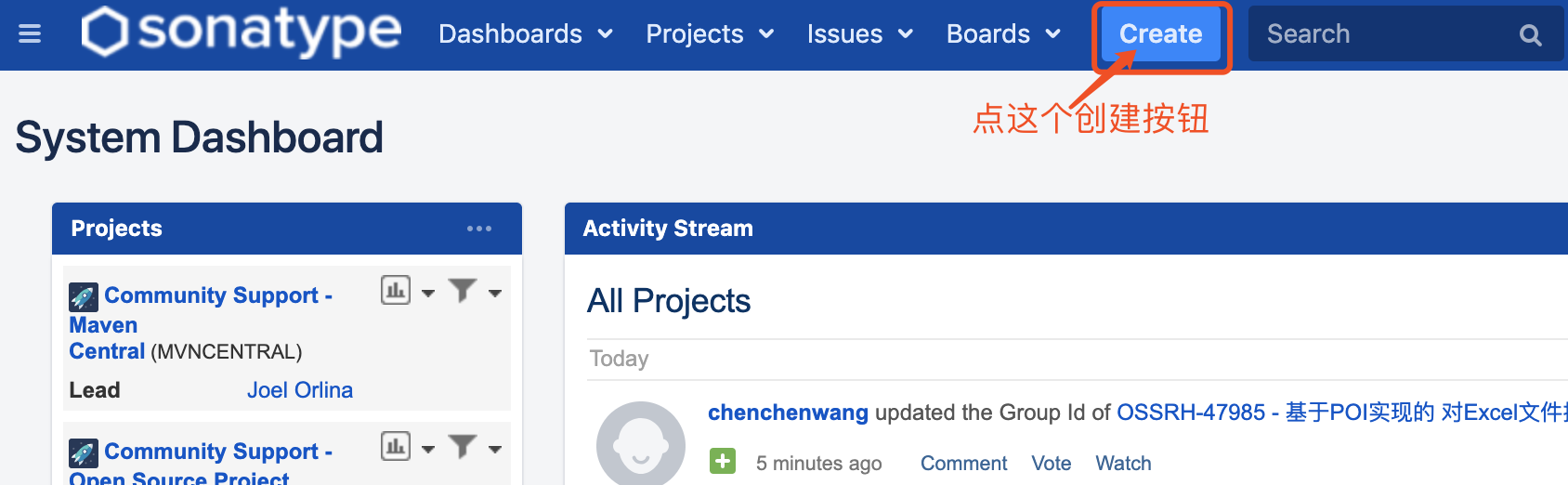
注册成功后,使用该账号进行登陆.可以看到如下的界面
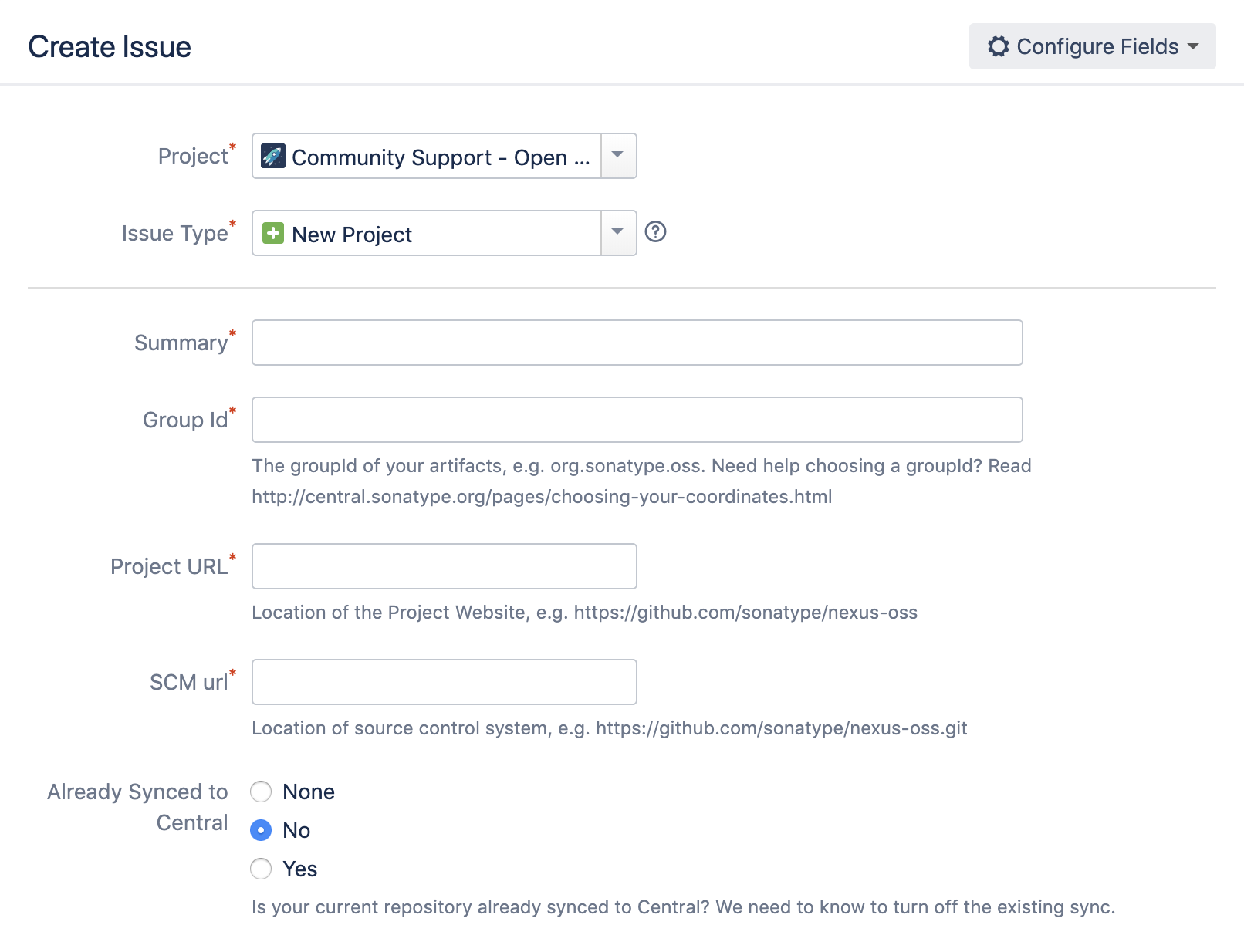
按照上图说明,点击按钮后会弹出创建ISSUE的界面
这个图里面的字段都是必填的,实际的界面还会多一些选填的内容.
界面上的其他选填内容,按需填写即可.
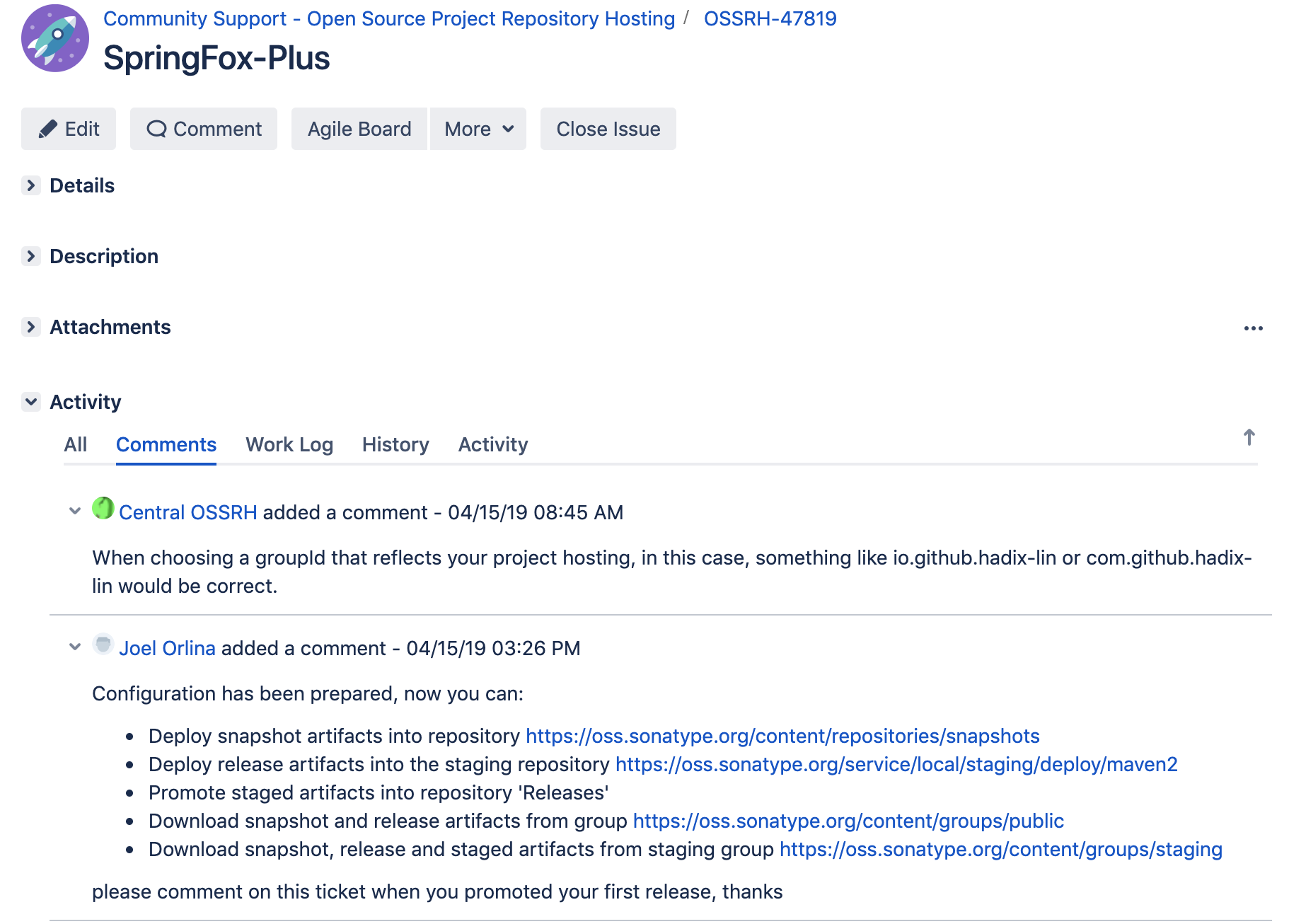
ISSUE创建成功后进入如下图页面
主要关注评论部分,如果之前表单填写的内容不规范,会在评论区里收到反馈,按要求编辑修改ISSUE即可.例如途中第一条评论告知我填写的groupId不和规范,并给了我建议的写法.
ISSUE正确后,过一段时间会收到类似图中的第二条评论,告知您现在可以向仓库提交构件了.
SETP2 : 配置您的POM,令您的项目满足先决条件 先决条件 您的开源项目必须符合以下条件才能允许被发布:
提供javadoc和源代码包
1
2
example-application-1.4.7-sources.jar example-application-1.4.7-javadoc.jar
所有发布的文件必须使用GPG签名
所有的文件使用GPG签名后,将签名内容存放在.asc文件中,例如:您的项目包含如下文件:
1
2
3
4
example-application-1.4.7.pom example-application-1.4.7.jar example-application-1.4.7-sources.jar example-application-1.4.7-javadoc.jar
那么得到的签名文件如下:
1
2
3
4
example-application-1.4.7.pom.asc example-application-1.4.7.jar.asc example-application-1.4.7-sources.jar.asc example-application-1.4.7-javadoc.jar.asc
POM文件中要包含足够的元数据
正确的坐标GAV(<groupId>,<artifactId>,<version>)
项目名称<name>, 描述<description> 和项目主页地址<url>
许可证信息<licenses>
开发者信息<developers>
源码控制系统(SCM)信息<scm>
文章最后会提供我的springfox-plus 的pom文件供参考.
为满足上述条件,编写如下的pom文件 1 2 3 4 5 6 7 8 9 10 11 12 13 14 15 16 17 18 19 20 21 22 23 24 25 26 27 28 29 30 31 32 33 34 35 36 37 38 39 40 41 42 43 44 45 46 47 48 49 50 51 52 53 54 55 56 57 58 59 60 61 62 63 64 65 66 67 68 69 70 71 72 73 74 75 76 77 78 79 80 81 82 83 84 85 86 87 88 89 90 91 92 93 94 95 96 97 98 99 100 101 102 103 104 105 106 107 108 109 110 111 112 113 114 115 116 117 118 119 120 121 122 123 124 125 126 127 <?xml version="1.0" encoding="UTF-8" ?> <project xmlns:xsi ="http://www.w3.org/2001/XMLSchema-instance" xmlns ="http://maven.apache.org/POM/4.0.0" xsi:schemaLocation ="http://maven.apache.org/POM/4.0.0 http://maven.apache.org/xsd/maven-4.0.0.xsd" > <modelVersion > 4.0.0</modelVersion > <groupId > io.github.hadix-lin</groupId > <artifactId > springfox-plus-parent</artifactId > <packaging > pom</packaging > <version > 0.0.1</version > <name > springfox-plus</name > <description > An extension of SpringFox that supports read javadoc as API document</description > <url > https://github.com/hadix-lin/springfox-plus</url > <licenses > <license > <name > The Apache Software License, Version 2.0</name > <url > http://www.apache.org/licenses/LICENSE-2.0.txt</url > </license > </licenses > <developers > <developer > <name > hadix</name > <email > hadix.lin@gmail.com</email > </developer > </developers > <scm > <connection > scm:git@github.com:hadix-lin/springfox-plus.git</connection > <developerConnection > scm:git@github.com:hadix-lin/springfox-plus.git</developerConnection > <url > https://github.com/hadix-lin/springfox-plus</url > </scm > <dependencies /> <profiles > <profile > <id > release</id > <build > <plugins > <plugin > <groupId > org.apache.maven.plugins</groupId > <artifactId > maven-source-plugin</artifactId > <version > 3.0.1</version > <executions > <execution > <phase > package</phase > <goals > <goal > jar-no-fork</goal > </goals > </execution > </executions > </plugin > <plugin > <groupId > org.apache.maven.plugins</groupId > <artifactId > maven-javadoc-plugin</artifactId > <version > 3.1.0</version > <configuration > <show > private</show > <nohelp > true</nohelp > <charset > UTF-8</charset > <encoding > UTF-8</encoding > <docencoding > UTF-8</docencoding > </configuration > <executions > <execution > <phase > package</phase > <goals > <goal > jar</goal > </goals > </execution > </executions > </plugin > <plugin > <groupId > org.apache.maven.plugins</groupId > <artifactId > maven-gpg-plugin</artifactId > <version > 1.6</version > <executions > <execution > <phase > verify</phase > <goals > <goal > sign</goal > </goals > </execution > </executions > </plugin > <plugin > <groupId > org.sonatype.plugins</groupId > <artifactId > nexus-staging-maven-plugin</artifactId > <version > 1.6.8</version > <extensions > true</extensions > <configuration > <serverId > oss</serverId > <nexusUrl > https://oss.sonatype.org/</nexusUrl > <autoReleaseAfterClose > true</autoReleaseAfterClose > </configuration > </plugin > </plugins > </build > <distributionManagement > <snapshotRepository > <id > oss</id > <url > https://oss.sonatype.org/content/repositories/snapshots/</url > </snapshotRepository > <repository > <id > oss</id > <url > https://oss.sonatype.org/service/local/staging/deploy/maven2/</url > </repository > </distributionManagement > </profile > </profiles > </project >
上面的pom文件是从我的项目中截取的,全文可以看这里
另外还要在您的全局maven配置中添加如下内容
1 2 3 4 5 6 7 8 9 <servers > <server > <id > oss</id > <username > 用户名</username > <password > 密码</password > </server > </servers >
准备GPG签名密钥 上文中配置的maven-gpg-plugin需要本机配置好GPG密钥,GPG是一种非对称加密算法,密钥要公钥私钥,公钥需要上传到公钥服务器上,私钥安装在本地.
在macOS下通过brew安装gpg命令,然后生成密钥:
1 2 3 4 5 6 7 8 9 10 11 12 13 14 15 16 17 18 19 20 21 22 23 24 25 brew install gpg gpg --version gpg --gen-key gpg --list-keys gpg --keyserver hkp://pool.sks-keyservers.net --send-keys <您的公钥> gpg --keyserver hkp://pool.sks-keyservers.net:80 --send-keys <您的公钥> gpg --keyserver hkp://pool.sks-keyservers.net --recv-keys <您的公钥> gpg --keyserver hkp://pool.sks-keyservers.net:80 --recv-keys <您的公钥>
STEP3 : 发布到sonatype仓库 上面已经配置好了maven的pom文件,可以直接使用如下命令进行发布
1
2
3
4
5
6
mvn clean deploy -P release export GPG_TTY=$(tty )mvn clean deploy -P release
如果您的项目版本号是以-SNAPSHOT结尾,那么构件将发布到snapshot仓库,不会同步到中央仓库.
如果您的项目构建不满足上文中的先决条件,那么上述命令会返回类似如下的输出
1
2
3
4
5
6
7
8
9
10
11
12
13
14
[ERROR] Rule failure while trying to close staging repository with ID "iogithubhadix-lin-1002" . [ERROR] [ERROR] Nexus Staging Rules Failure Report [ERROR] ================================== [ERROR] [ERROR] Repository "iogithubhadix-lin-1002" failures [ERROR] Rule "pom-staging" failures [ERROR] * Invalid POM: /io/github/hadix-lin/http/1.0/http-1.0.pom: Project name missing, Project description missing, Project URL missing [ERROR] [ERROR] [ERROR] Cleaning up local stage directory after a Rule failure during close of staging repositories: [iogithubhadix-lin-1002] [ERROR] * Deleting context ac894b84a446a7.properties [ERROR] Cleaning up remote stage repositories after a Rule failure during close of staging repositories: [iogithubhadix-lin-1002] [ERROR] * Dropping failed staging repository with ID "iogithubhadix-lin-1002" (Rule failure during close of staging repositories: [iogithubhadix-lin-1002]).
按提示修改项目的pom文件即可.例如上面这段错误信息提示我的项目没有Project name.在pom中增加<name>http</name>即可.
STEP4 : 回复ISSUE来发起同步 首次发布构件的时候,是不会自动同步到中央仓库的.当上面的步骤全部执行成功后,需要找到最初创建的ISSUE页面.在评论区用英文写一条评论,比如”the first release version(0.0.1) uploaded via maven”.然后耐心等待,会收到回复.像下面图中的样子.
以后只要是同一个groupId的构件发布就不需要再来回复了.发布后过差不多两个小时就会自动同步到中央仓库.
如果要发不不同groupId的构件,那么请重复STEP1中创建ISSUE的操作.